The SDdesign Toolkitis coming to Revit.
Revit add-ins built by a working architect.
Nine apps on their own Revit tab that take the repetitive work out of real production: permit sets, sheets, code data, kitchen equipment, gas risers, finish plans, clean backgrounds, family libraries and AI that understands your model.

Spend your hours on design, not on drafting chores.
Every tool in the Toolkit started as a task that ate real time on real projects. Now those tasks take a click, so you can get back hours on every project and put them into the work that matters.
One-click permit sets
Build the full set of sheets and titleblocks and export it in one go, instead of assembling it page by page.
Code data, handled
Keep project code data in one place, run occupant load calcs and drop a code and zoning block right on the cover sheet.
Kitchens without the grind
Number, tag and schedule food-service equipment, then size the gas piping from that same schedule.
AI inside Revit
Ask questions about your model in plain language and have it make changes that you preview before they happen.
Meet the Toolkit
Each app has its own color and its own job, from the cover sheet to the gas riser.

SetGo
Permit setsYour whole permit set, built and exported in one go.
- Creates a complete permit drawing set
- Sets up sheets and titleblocks for you
- Exports the finished set in one step


Hang Time
Sheets & viewsViews on sheets, lined up and numbered, without the nudging.
- Places views on sheets
- Aligns views across sheets
- Renumbers details automatically


Code Breaker
Code & zoningCode data and occupant loads, right on the cover sheet.
- Stores the project's code data
- Runs occupant load calculations
- Drops a code and zoning block on the cover sheet


Mise en Place
Kitchen equipmentCommercial kitchen equipment, organized from plan to package.
- Numbers and tags equipment on plans
- Builds the kitchen equipment schedule
- Exports equipment lists and cut-sheet packages


Gas Works
Gas risersGas risers and pipe sizing, straight from the schedule.
- Builds the gas riser diagram
- Creates the GAS INFORMATION table
- Sizes pipe per IFGC tables automatically


Finish Line
Finish plansFinish plans drawn for you, with tags you can edit.
- Draws finish lines offset from walls
- Adds editable finish tags (P-1, WP-1…)
- Clears finish lines when plans change


Clean Sweep
Clean backgroundsOne click to a clean base plan, even from messy CAD.
- Strips a plan to the base plan, or base plus equipment
- Handles messy exploded CAD
- Fast electrical, lighting and plumbing backgrounds
- Restores the view when you're done


Family Tree
Family libraryFind the right family fast, from your library or RevitCity.
- Searches your library and RevitCity side by side, with thumbnails
- Files downloads into an organized library
- Loads and places families for you


Talk Shop
AI in RevitTalk to your model. It talks back, and gets to work.
- AI chat right inside Revit
- Ask questions about your model
- Have it make changes, previewed before they're applied

Kitchen tools you won't find anywhere else.
Tools for commercial kitchen work are rare in Revit. Mise en Place and Gas Works were built for exactly that work: the equipment, the schedules, the cut sheets and the gas piping.
Mise en Place
Numbers equipment, tags plans, builds the kitchen equipment schedule and exports equipment lists and cut-sheet packages.
Gas Works
Turns the equipment schedule into a gas riser diagram and GAS INFORMATION table, sizing pipe per IFGC tables automatically.
Its own tab, right where you work.
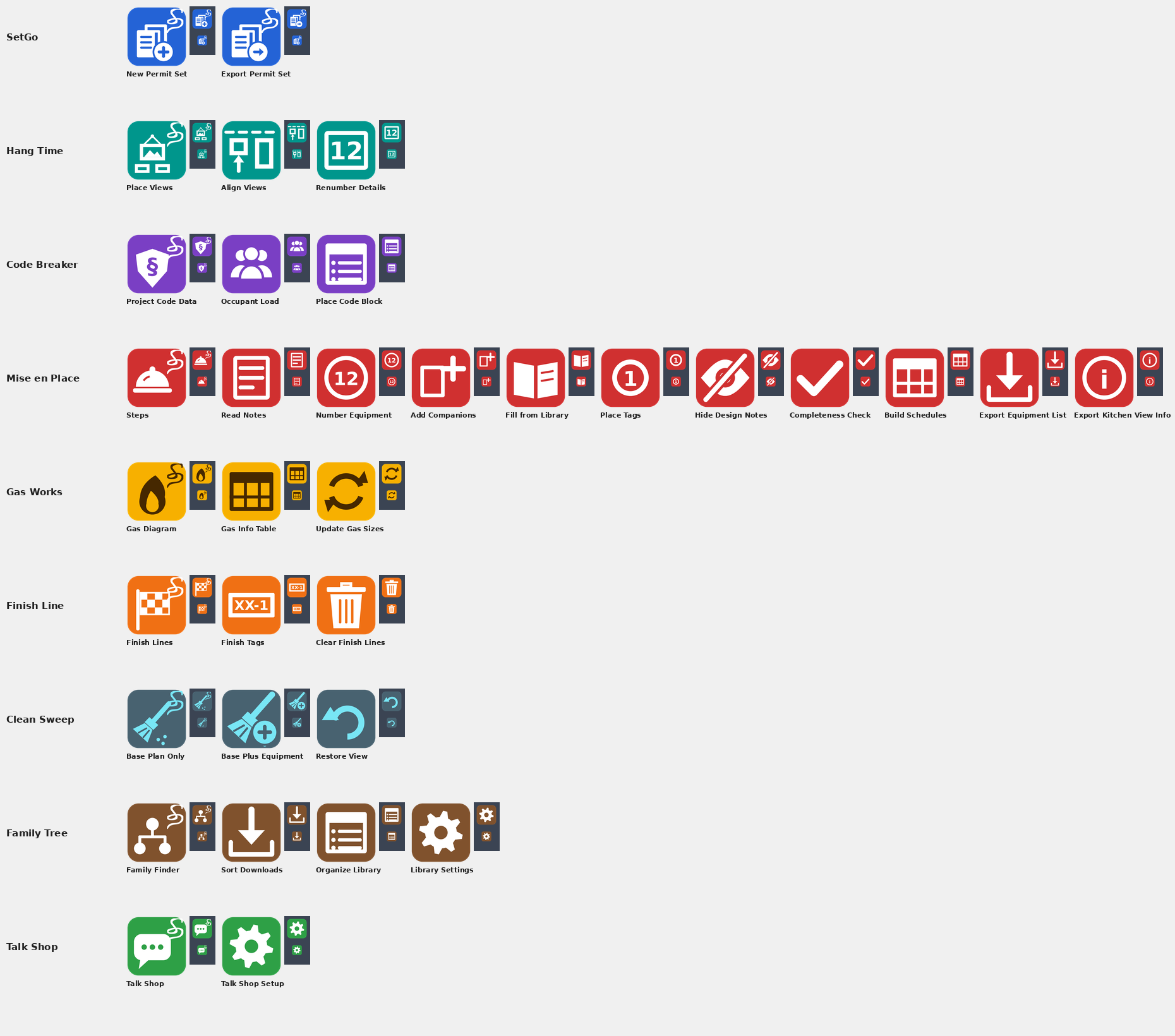
This is the real SDdesign Toolkit ribbon running in Revit during the private beta. Every app is grouped and color-coded, so you can find the right tool at a glance.

Actual ribbon screenshot from the private beta. Swipe the ribbon sideways to see every app.
See every button, grouped by app
This is just the start.
The Toolkit keeps growing, and founding members help decide what comes next.
Get in early.
The SDdesign Toolkit is in private beta now. Join the founding-member list to be first in line.
Founding members get early beta access and a launch discount.
- Early access to the private beta
- A founding-member launch discount
- A say in which tools get built next
Join the founding-member list
We'll only use your details to send Toolkit beta and launch news. Unsubscribe anytime.
You're on the list!
Thanks for joining the SDdesign Toolkit founding members. We'll be in touch with beta and launch news.